
Getting into robotics is easier than ever. Thanks to open-source technology and affordable 3D printing, makers can now build functional robots from a desk, classroom, or makerspace using downloadable designs and widely available hardware.
Many of these DIY robots are now used to experiment with physical AI — systems that sense their environment, control motors, and interact with the real world.
Below are some of the most popular open-source 3D-printed robot projects that makers, students, and researchers can build today.
Table of Contents
Project 1: Petoi Bittle-Based 3D-Printed Robot Dog
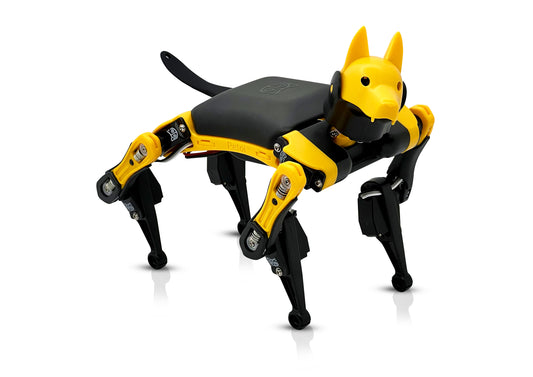
Bittle is a highly popular, programmable quadruped robot loved by makers, developers, educators, and students. While available as a complete DIY kit, the project's open-source ecosystem is what truly makes it stand out. This means enthusiasts can choose to purchase the kit or 3D-print and customize their own robot's body and parts entirely from scratch.
The following open-source 3D-printed robot dog projects demonstrate that you can print all the body, limbs, and neck components using publicly available STL files.
3D-printed robot dog projects
The Bittle 3D-printed robot dog project from GRABCAD

Bittle Robot Dog With Arduino from Cults3D

Additional 3D-printed robot dog parts
Check the official 3D-printed files from Petoi and the 3D-printed Bittle part files from yeggi.
All these resources provide the hardware schematics and design files, giving you the freedom to build a unique robot dog from the ground up using common electronics like the Arduino or ESP32 board for control. This customization potential makes Bittle an incredible platform for learning design, engineering, and coding.
Why Bittle 3D-Printed Robot Dogs Stand Out
- A perfect entry point for quadruped robot building and programming.
- Ideal for learning how to build animal structures into a walkable robot.
- Focuses on lifelike animal movements (biomimetic design).
- Access to a large, supportive community and a well-documented open source code base.
What You'll Need
- Option 1: Complete Kit - Purchase Petoi Bittle X DIY robot kit, which includes the pre-printed parts, BiBoard microcontroller, servos, and battery. Note that Bittle X is the next-generation of Bittle. They share the same body frames and parts. And all the hardwares are compatible with each other.
- Option 2: 3D Print - Use the 3D-printed quadruped robot dog files, a 3D printer, and separately source components from Petoi Bittle X DIY kit, such as the BiBoard microcontroller, servos, and battery.
- A computer with the Arduino IDE or Petoi's visual block-based programming environment installed.
What You Can Do
Let's see a demo of Bittle X robot dog first:
The main learning objective is to assemble a complex, multi-jointed robot dog and then program it to perform a variety of gaits and behaviors. You'll move from basic physical construction to understanding how code controls each servo motor to create synchronized lifelike movements. This is a far more engaging and complex challenge than simple wheeled robots. You can also control your Bittle 3D-printed robot dog with Petoi Mobile App or voice commands to perform 35+ built-in lifelike robot dog skills and acrobatic skills such as backflipping or frontflipping. You may need to reprint the body parts if they are broken due to the excess landing force during the flip.
Design custom parts for your robot dog
Pair your robot with a 3D-printed outfit
See more 3D-printed robot outfit videos here.
Add a Gripper for Object Manipulation
Optional, you can use the Petoi robotic arm kit to add a gripper to program your robot dog to pick up and move things around.
What You'll Learn
- Biomimetic Assembly: Build a robot dog that mimics animal anatomy, supporting up to 9 servo motors to move around and perform different dog-like poses.
- Servo Motor Control: Master controlling multiple motors for smooth, dynamic movements.
- Behavioral Programming: Learn to create realistic and expressive quadruped robot behaviors with friendly programming languages such as block coding, Python, C++, and free robotics curricula.
- Open-Source Collaboration: Learn from and contribute to a global community.
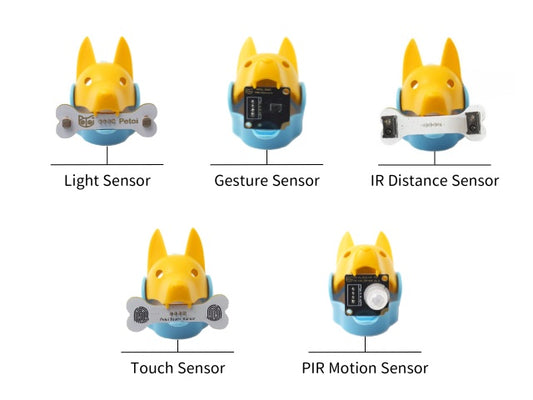
- Sensor programming: Program the built-in back touch sensor to enable the dog to detect touches and respond playfully.
- Gyroscope Programming: Use the onboard gyroscope to detect and correct the robot's balance and orientation for stable movement.
- Fun playing time: Control it with Petoi Mobile App or voice commands to perform 35+ built-in lifelike robot dog skills.
Project 2: Cute OpenCat 3D-Printed Robot Cat
If you ever want to build your own cute robot cat, look no further than these OpenCat 3D-printed robot cat projects.
Just a little bit of history first: I started prototyping OpenCat quadruped robot back in 2016. The first demo video with the cat-like version of Boston Dynamics' quadruped robot Spot Mini brought so much excitement to the open source quadruped community. OpenCat has become the most starred open source quadruped robot framework on GitHub.
Then I developed Nybble robot cat, the 1st commercial robot based on OpenCat. It's a palm-sized programmable cat robotics kit targeting kids aged 10+ interested in STEM or anyone interested in building and programming their own programmable robot pets.
3D-printed robot cat projects
The OpenCat community has built around my design and made their own 3D-printed robot cats:
Nybble 3D model on 3D Warehouse

OpenCat Nybble DIY Thingiverse

Petoi Nybble Q ESP32 Coding Robot Cat
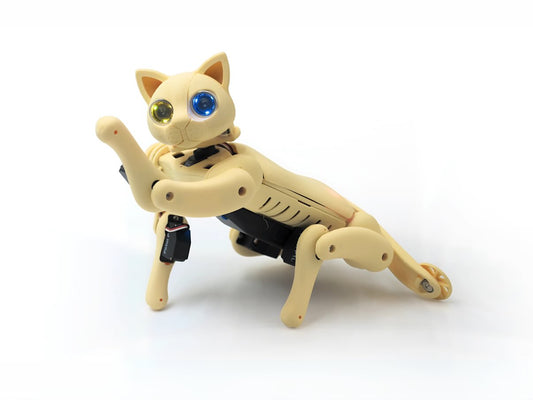
Petoi Nybble Q is the latest robot cat generation from Petoi. It's a fantastic option for anyone who wants to learn the fundamentals of quadruped robotics with a focus on graceful, cat-like movements.
Additional 3D-printed robot cat parts
Check the official 3D-printed files from Petoi and the 3D-printed Nybble robot cat part files from yeggi.
All these free resources allow users to 3D print the parts for their own robot cats. In addition, these robots are also compatible with the electronic hardware designed and sold by Petoi.
Why OpenCat 3D-Printed Robot Cats Stand Out
- Simplifies biomimetic robotics with a feline twist.
- Designed for learning about animal robot structure and motion.
- Uses powerful yet affordable off-the-shelf microcontroller and servos, supports friendly programming options.
- A perfect entry point for quadruped robot building and programming.
- Access to a large, supportive Petoi OpenCat community and a well-documented OpenCat open source code base.
What You'll Need
- Option 1: Complete Kit - Purchase Petoi Nybble wooden robot kit or Petoi Nybble Q 3D-printed robot kit, which includes the pre-printed parts, NyBoard, BiBoard microcontroller, servos, and battery.
- Option 2: 3D Print - Use the 3D-printed quadruped robot cat files, a 3D printer, and separately source components from Nybble or Nybble Q kits, such as the BiBoard microcontroller, servos, and battery.
- A computer with the Arduino IDE or Petoi's visual block-based programming environment installed.
What You Can Do
The central challenge is to assemble the robot cat, customize its look, and then program it to perform graceful, fluid movements. The OpenCat robot cat's design lends itself to cat-specific gaits and poses, giving you a chance to experiment with new programming challenges. This is a great project for those who want to see how slight design changes can impact a robot's motion.
You can also control your OpenCat robot cat with Petoi Mobile App or voice commands to perform 35+ built-in lifelike robot dog skills.
What You'll Learn
- Biomimetic Assembly: Build a robot that mimics the anatomy and movements of a cat, supporting up to 11 servo motors to move around and perform different cat-like poses, such as tail wagging.
- Servo Motor Control: Master controlling multiple motors to create dynamic, graceful movements.
- Behavioral Programming: Learn to create realistic and expressive quadruped robot behaviors with friendly programming languages such as block coding, Python, C++, and free robotics curricula.
- Open-Source Collaboration: Learn from and contribute to a global community.
- Sensor programming: Program the built-in ultrasonic sensor to enable the cat to avoid objects in front of it.
- Gyroscope Programming: Use the onboard gyroscope to detect and correct the robot's balance and orientation for stable movement.
No matter whether you are a dog or a cat person, you will find some inspiration from all the OpenCat robots from around the world:
Learn more about the OpenCat DIY robot dog and robot cat projects now!
Project 3: Amazing Hand - The Open-Source 3D-Printed Humanoid Hand
Pollen Robotics has open-sourced "The Amazing Hand", a high-performance, fully 3D-printed robotic hand designed to lower the barrier to entry for humanoid robotics. It is a self-contained unit with eight degrees of freedom (DOF) and can be built for less than €200 in off-the-shelf components, making advanced anthropomorphic design accessible to hobbyists and researchers alike.

Why It Stands Out
- Low-Cost, High-Performance: Packs 8 DOFs into a self-contained, 3D-printed design with off-the-shelf parts costing less than €200.
- Simplified Control: Uses a mechanical linkage to synchronize proximal and distal joints, simplifying the motor control challenge.
- Anthropomorphic Design: Features a 4-finger design with an opposable thumb and a flexible palm for object-friendly grasping.
- Fully Open-Source: All CAD, firmware, and control files are available on GitHub for full customization and modification.
What You'll Need
- A 3D printer capable of printing the necessary components.
- Dual hobby-grade servo motors per finger (8 in total) and other off-the-shelf electronic components.
- A computer and a good understanding of programming for control.
- Access to a GitHub repository for the Bill of Materials (BOM), 3D files, assembly guide, and demo programs.
What You Can Do
The main challenge is to assemble the complex, multi-jointed hand and then program its movements, which requires exploring non-trivial inverse kinematics. You can customize the wrist mount to attach it to other robot arms, or experiment with a webcam-based hand tracking demo to drive the finger motion according to your own hand. The open-source nature allows you to modify the design, such as adding sensors or a fifth finger.
What You'll Learn
- Anthropomorphic Robotics: Deep dive into the design and function of human-like robotic hands.
- Inverse Kinematics: Learn to calculate complex joint angles to achieve a desired hand position and grasp pattern (using libraries like Mink).
- Advanced Assembly: Master the construction of complex mechanical linkages and multi-DOF joints.
- Open-Source Hacking: Gain experience in modifying and contributing to a live open-source robotics project.
Project 4: Poppy - Interactive 3D Printed Humanoid Robot
Poppy is an open-source platform for creating, using, and sharing interactive 3D-printed humanoid robots, with a focus on education and creativity. Its community-driven approach makes it an excellent project for learning about the intersection of computer science, art, and robotics.

Why It Stands Out
- A great platform for exploring human-robot interaction and artistry.
- Promotes learning through an open and creative community.
- A perfect project for combining computer science with creativity and education.
What You'll Need
- A 3D printer for all the frame and chassis components.
- Dynamixel servo motors for precise movements.
- A Raspberry Pi for the brain, and an Arduino board for low-level motor control.
- A computer and a good understanding of Python and C++ programming.
What You Can Do
The central challenge is to assemble a multi-jointed robot and then program it to perform different gaits. You'll have to learn how to manage the synchronization of many joints to achieve stable walking. You'll also learn to program a wireless controller, which is a key skill for any robotics enthusiast.
What You'll Learn
- Advanced Mechanical Design: Build complex robotic components.
- Kinematics: Understand how to calculate joint angles for specific movements.
- Wireless Control: Learn to remotely control your robot via Bluetooth.
- C++ Programming: Write code to manage a large number of robot components.
Project 5: InMoov - The Life-Sized Humanoid
InMoov is an ambitious open-source project to build a full-size, 3D-printed humanoid robot. The robotic arm is one of the most popular and challenging parts of this project, and it offers an incredible learning experience in humanoid robotics.

Why It Stands Out
- Allows you to create something truly impressive and life-sized.
- Focuses on learning human-robot interaction on a large scale.
- A deep dive into the complexities of biomimetic design.
- A long-term project that offers immense rewards.
What You'll Need
- A 3D printer with a large print volume to print the sizable parts.
- Many high-torque servo motors for each joint (including fingers).
- Arduino boards and various sensors.
- A computer and a good understanding of C++ or other programming languages.
- A great deal of patience and dedication!
What You Can Do
The primary challenge is assembling a multi-jointed arm and then programming its movements. This requires a strong understanding of kinematics—the science of motion. You'll have to figure out how to program the robot's arm to move its end-effector (the hand) to a specific point in space, which involves complex calculations and careful calibration.
What You'll Learn
- Advanced Assembly: Build a life-sized replica of a human arm.
- Inverse Kinematics: Calculate joint angles to achieve a desired hand position.
- Sensor Integration: Use sensors to help your robot perceive its environment.
- Project Management: Learn to manage a large, multi-component project.
Project 6: Otto DIY - The Bipedal Dancing Robot
Otto DIY is a simple, charming, and highly accessible bipedal robot designed specifically for beginners. This project is the perfect entry point into 3D printing and coding for robotics, especially for younger learners or those with no prior experience.

Why It Stands Out
- All about instant gratification and foundational learning.
- Parts are easy to 3D print on almost any home printer.
- A fun way to learn the basics of servo motor control and motion programming.
- A fantastic stepping stone to more complex robots.
What You'll Need
- A 3D printer for the body parts.
- An Arduino Nano microcontroller.
- Four mini servo motors.
- A computer and a good understanding of block-based coding or C++.
What You Can Do
The main challenge for a beginner is assembling the robot and then writing the code to make it walk without falling over. This involves carefully sequencing the movements of each servo motor to maintain balance and achieve a forward gait. You'll quickly learn that timing and coordination are everything in robotics.
What You'll Learn
- Mechatronics: Combine mechanical parts with electronics to create a functional robot.
- Basic Coding: Write simple programs to control robot movements.
- 3D Printing: Gain hands-on experience with the entire 3D printing process.
- Simple Kinematics: Get an introduction to the movements required for a bipedal robot.
Project 7: OpenBot - Smartphone-Powered Autonomous Robot
OpenBot is an open-source platform that transforms any modern smartphone into a low-cost autonomous robot by providing a 3D-printable chassis and the necessary control software. It is designed to democratize research and learning in mobile robotics, making it perfect for exploring computer vision and autonomous navigation.

Why It Stands Out
- Low-Cost Autonomy: Leverages a smartphone's powerful processor, high-resolution camera, and rich sensor suite, making it an incredibly affordable entry point into autonomous robotics.
- Mobile-First Design: The software is highly optimized for leveraging smartphone capabilities for real-time computer vision tasks using frameworks like TensorFlow Lite.
- Rich Data Collection: The platform enables users to easily collect and label real-world sensor and vision data for training new machine learning models for navigation and other tasks.
What You'll Need
- A 3D printer to print the chassis parts.
- A modern Android smartphone to serve as the robot's "brain".
- An Arduino Nano or similar microcontroller for low-level motor control.
- Two DC motors and a motor driver board.
- A computer for programming and setting up the control software.
What You Can Do
The central challenge is to program the robot for advanced autonomous navigation and object detection. You will implement and test various machine learning models (like those based on TensorFlow Lite) for tasks such as following a person, navigating autonomously, or avoiding obstacles. You will also learn to collect and label your own real-world data directly from the robot to train an AI model from scratch.
What You'll Learn
- Mobile Robotics Stack: Understand the full hardware and software architecture of an autonomous mobile robot.
- Computer Vision & ML: Gain hands-on experience with deploying and testing machine learning models for real-time vision tasks like object detection and tracking.
- Data-Driven AI: Learn the process of collecting and using real-world data to train and refine an AI model.
- Hardware Integration: Master the integration of powerful smartphone hardware with a simple microcontroller and motors.
Project 8: Berkeley Humanoid Lite - The Low-Cost, Full-Body Humanoid
The Berkeley Humanoid Lite project is an open-source, affordable platform for creating a full-body humanoid robot. Developed by the Berkeley Artificial Intelligence Research (BAIR) Lab, it is designed to be highly modular and uses affordable, off-the-shelf components, drastically lowering the cost barrier for advanced humanoid research and education. It's an excellent project for exploring bipedal locomotion, whole-body control, and complex manipulation tasks.

Why It Stands Out
- Modular & Low-Cost: Features a modular design using a mix of 3D-printed parts and commercial components like low-cost motor controllers and actuators, making it highly accessible.
- Full-Body Control: The platform is engineered for complex bipedal gaits and whole-body inverse kinematics.
- Educational Focus: Provides a comprehensive software stack and documentation suitable for advanced robotics courses and research.
- Open-Source Everything: All hardware (CAD files), software, and control frameworks are freely available on GitHub.
What You'll Need
- A 3D printer capable of printing the frame and joint components.
- High-torque servo motors/actuators for the many degrees of freedom in the legs, arms, and torso.
- A powerful microcontroller or single-board computer (like a Raspberry Pi or an industrial PC) for high-level control.
- A computer and a strong background in Python and C++ for the software stack.
- Access to the GitHub repository for all design and control files.
What You Can Do
The main challenge is to program the robot's bipedal movements and maintain dynamic balance. This involves implementing complex whole-body control algorithms and state estimation. You can experiment with different walking gaits, teach the robot to navigate and interact with objects, or integrate advanced sensor systems for real-time perception. The open design encourages researchers and students to modify the hardware and control methods for new experiments.
What You'll Learn
- Bipedal Locomotion: Master the principles and challenges of stable, bipedal walking and dynamic balance control.
- Whole-Body Inverse Kinematics: Learn to calculate the joint angles for an entire humanoid body to achieve complex postures and end-effector positions.
- Control Theory: Deep dive into advanced feedback control loops necessary for stable movement.
- Full-Stack Robotics: Understand the entire architecture from low-level motor control to high-level task planning.
Open-Source Contribution: Engage with a high-level academic open-source project and contribute to cutting-edge research.
Comparison of Popular Open-Source 3D-Printed Robot Projects
| Project | Robot Type | Difficulty | Hardware Needed | Programming | Best For |
|---|---|---|---|---|---|
| Bittle-Based 3D-Printed Robot Dog | Quadruped robot dog | Beginner–Intermediate | Servos, battery, microcontroller (BiBoard/NyBoard), optional Raspberry Pi, 3D printer | Arduino C++, Python, block coding | Learning quadruped dog structure, locomotion, and AI robotics; STEM/maker/robotics education |
| OpenCat robots | Quadruped robot cat | Beginner–Intermediate | Servos, battery, microcontroller (BiBoard/Nyboard), optional Raspberry Pi, 3D printer | Arduino C++, Python, block coding | Learning quadruped cat structure, locomotion, and AI robotics; STEM/maker/robotics education |
| Amazing Hand | Humanoid robotic hand | Intermediate–Advanced | 3D printer, servo motors, mechanical linkages | Python, robotics libraries | Dexterous manipulation and robotics kinematics |
| Poppy Robot | Humanoid robot | Advanced | Dynamixel servos, Raspberry Pi, Arduino | Python, C++ | Human-robot interaction and robotics research |
| InMoov | Full humanoid robot | Advanced | 3D printer, many servos, sensors | Java, Python | Humanoid robotics and large-scale builds |
| Otto DIY | Biped robot | Beginner | Arduino Nano, 4 servos, simple 3D prints | block coding, C/C++ | Beginner robotics and coding education |
| OpenBot | Autonomous mobile robot | Intermediate | Smartphone, motors, Arduino, 3D-printed chassis | Java/Kotlin, Python | Computer vision and autonomous navigation |
| Berkeley Humanoid Lite | Full humanoid robot | Advanced / Research | High-torque actuators, SBC computer, sensors | Python, C++ | Bipedal locomotion and robotics research |
Where Should Beginners Start with Open-Source Robots with Limited Access to 3D Printers?
Many open-source 3D-printed robots require extensive 3D printing, mechanical assembly, and custom electronics. While these projects are exciting, they can also take weeks or months before the robot is fully operational. If your goal is to start experimenting with robotics, coding, and AI quickly, using a programmable robotics platform can dramatically shorten the learning curve. Platforms such as Petoi’s open-source robot pets provide ready-to-assemble hardware combined with fully programmable motion control systems.
This allows learners to focus on robotics algorithms, sensors, and AI applications rather than building every mechanical component from scratch. Petoi robots are commonly used in STEM classrooms, maker labs, university robotics courses, and AI research experiments. Instead of spending weeks building hardware, students and developers can begin exploring robot locomotion, computer vision, and autonomous behavior within hours.
From DIY Robotics to AI Robotics
Many builders start with DIY 3D-printed robots to learn mechanical assembly and basic programming. As their skills grow, these platforms can evolve into powerful tools for exploring artificial intelligence in robotics.
By adding sensors, cameras, or robotic grippers, developers can experiment with vision-based navigation, AI-assisted locomotion, object detection and tracking, and robot manipulation tasks.
These experiments are part of a growing field known as physical AI or embodied AI, where intelligent algorithms control machines that interact with the real world.
Open-source 3D-printed robots provide one of the most affordable ways for makers, students, and educators to explore this emerging area of robotics.
Stay tuned for our detailed guide to AI robotics - building physical AI robots using open-source platforms.
Your Journey into Robotics Starts Now!
The world of robotics has never been more accessible. These projects, powered by open-source collaboration and 3D printing, offer a unique path to learning fundamental skills in coding, mechanics, and design.
Ready to start building your own open-source, 3D-printed robot? Petoi Bittle X and Nybble Q are the perfect places to start, offering a complete, well-supported kit that simplifies the entry into this exciting world.
Visit Petoi robot shop today to explore our full range of bionic robot pets and kits, and join a global community of innovators!
FAQ (Frequently Asked Questions)
Q: What's the biggest difference between open-source and a closed-source robot kit?
A: Open-source gives you the freedom to modify and share the hardware designs and code, fostering a community of collaboration. You can download the blueprints to 3D-print your own parts or add new features. A closed-source kit is a pre-designed product where you can't access or change the core intellectual property, which often limits you to what the manufacturer provides.
Q: Do I need a 3D printer to get started with these projects?
A: Not always! While many projects are designed around 3D printing, platforms like Petoi offer complete kits that include all the necessary 3D-printed parts. This allows you to start learning robotics and coding right away without needing to invest in a 3D printer first. However, having one lets you print your own custom shells and accessories to personalize your robot.
Q: What programming language should I learn for these projects?
A: For beginners, visual block-based coding (like Scratch or Google Blockly) is the best starting point. It allows you to program without worrying about complex syntax. Many open-source platforms, including Petoi, offer a visual programming interface. For more advanced projects, C++ (used with Arduino) and Python are the two most common and powerful languages in robotics.
Q: Are Petoi robots open-source?
A: Yes, Petoi robots' firmware is fully open-source. Some of the design files are open source. The community has also contributed open source 3D-printed designs. By investing in a Petoi robot, you get the benefit of a quality quadruped kit with the endless customization possibilities of an open-source project.