

THE BEST BENEFITS
Designed to Excel

Super-Powers
Interactive & Engaging
Voice-controlled and programmable to spark curiosity.
Multidisciplinary Learning
Covers coding (block-based programming, Python, C++), AI, robotics, and engineering.
Pre-Made Lesson Plans
Curriculum-aligned resources to make teaching easy.
Hands-On STEM
Encourages problem-solving, teamwork, and creativity.
Future-Proof Skills
Prepares students for careers in robotics, AI, automation, and technology.

Made for Classroom
Plug & Play
Easy setup, no complex assembly required.
Multiple Coding Languages
Suitable for beginners & advanced students
STEM Platforms Compatible
Works with Arduino, Raspberry Pi, and AI kits.
Have Bittle X Ignited Your Curiosity ?
Get in touch with us for details about Bittle X and get an Educator's Discount
Let customers speak for us

David
Outstanding customer support
On both occasions when needed I experienced Outstanding customer support
Robo Dog Bittle X | A Coding Robot | Petoi
Michael Setton
Very reactive and clear support
I had made a mistake in firmware modification which resulted in My Bittle showing strange behavior when re-booting. Tech support replied within an hour, tested my script, gave me advice and within a few hours my Bittle was saved, trotting and speaking again. Thank you for your top notch reactivity.
Robo Dog Bittle X | A Coding Robot | Petoi

P A
Excellent Robots
Love these robots for our classes. We get the fully assembled ones and they are much easier to get started with. However, the unassembled ones are also equally fun.
Robot Dog Bittle | A Programmable Robot Pet
Anonymous
Great customer service
Incredible customer service when I was having shipping issues.
Robo Dog Bittle X | A Coding Robot | Petoi

Thomas
❤️🔥🔥🔥🔥🔥🔥❤️🥳
IT IS PURRRRRFECT.
Robotic Cat Nybble Q Coding Robot Cat | Petoi
**
Good
Petoi
Brian
A Super Robot
The Bittle X V2 is really great. Very well put together and works really well out of the box. Great fu to play with, but a really good tools for learning about robotics, code, etc.
Robo Dog Bittle X | A Coding Robot | Petoi
nagi
Robot Dog Bittle | A Programmable Robot Pet
Petoi has very professional technical support. Whenever I have any problems using their products, the technicians are very patient in solving them for me. This has benefited me a lot from using them. Therefore, I highly recommend Petoi products. In addition to the products themselves being interesting and excellent, they also have perfect after-sales service. I really highly recommend them.
Petoi
Lee paulson
Absolutely amazing
Words cannot explain the experience 5 years after I bought it I messaged the guy for help and he replied within 30 mins. Absolutely amazing
Robot Dog Bittle | A Programmable Robot Pet
Bob Rieger Rieger
Fantastic Customer Service
I recently encountered a problem with my Bittle X related to the failure of a fuse on the Biboard v2. I contacted customer service, and they responded very quickly, in fact in the middle of their night. I was asked to send a video of the robot behavior, and from that the board problem was quickly solved. I was then offered a new board free of charge, and it was shipped to my home in Rhode Island from California. After a total delay of only 4 days, I installed the new board and everything worked fine.
I cannot say enough good things about the fast, friendly and responsive technical customer service. The problem was correctly diagnosed within 24 hours and there was not a moments hesitation in offering a replacement board free.
I would not hesitate to endorse Petoi for their products and service
Robotic Cat Nybble Q Coding Robot Cat | Petoi
Shelia Barbosa
Fantastic robot, amazing customer service
My son, 12, loves his Bittle. As a high level beginner at robotics, we felt Bittle would be a great way to help him advance his skills, and we were right. There are so many things to do with Bittle, from beginner to more advanced, and the learning is fun! We also found support to be eager & willing to help with any issues, and were genuinely interested in how my son was enjoying his robot. Excellent product and staff!
Robot Dog Bittle | A Programmable Robot Pet
Chad Yoshikawa
Best gift and customer service
My son, 14, loves his Bittle. He plays with it with our dog Libby (who thinks it’s another real dog and gets jealous!).
Afterwards year, we dropped the Bittle one two many times, however, and we damaged it. I reached out and Kai and Junfeng not only shipped us a new, updated board but also some parts for free. Customer service has been the best - with Kai checking on the order every step of the way. I ended up getting a second robot as well. One of the best experiences I’ve had dealing with a company.
Robot Dog Bittle | A Programmable Robot Pet
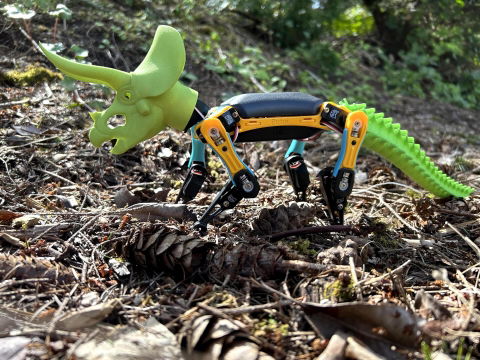
Michael W
The perfect customizable robot of the future!
Bittle is an amazing playground for those who are interested in coding and robotics. It’s a real first step in consumer based robots. I’ve had mine for over a year now and it still works perfectly.
Robot Dog Bittle | A Programmable Robot Pet
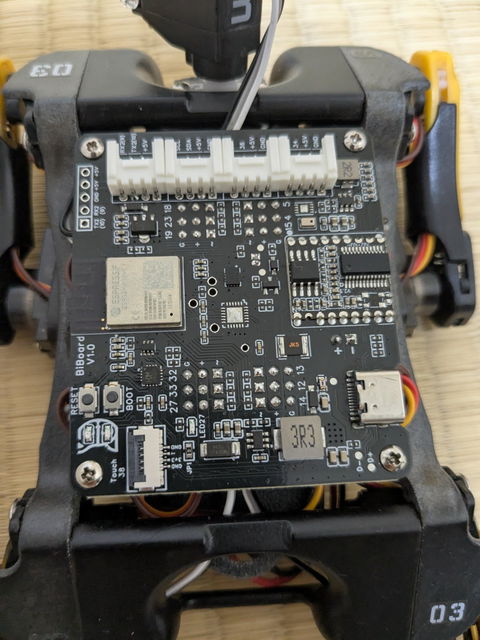
Nao
I bought a BiBoard V1
Now that it can recognize voice, I've grown to love it even more.
Cool!!!
ESP32 Development Board | High-performance for Quadruped Robots
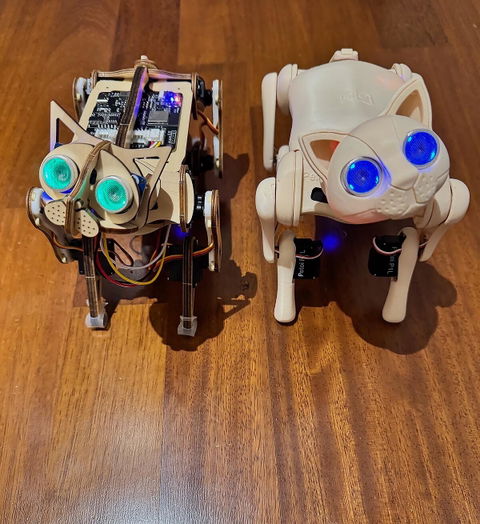
B.G.
Next gen robot cat - improvement over the original
The Nybble Q is more stable than the original Nybble as the weight distribution seems to be better balanced and the servos appear to be more responsive. The walking gait is successful even on low pile area rugs. The 3D printed body is a more finished look, though the original wooden robot does look like a cool science experiment. The four touch sensors provide additional fun interactivity with the robot. The servos now have feedback for positioning. The BiBoard V1 is a great improvement over the Nyboard. There is more than sufficient memory to compile the full program, and with the independent serial ports, both the voice and ultrasonic are active. Using the app via Bluetooth can easily switch between ultrasonic and voice. I was so impressed with the NYbble Q that I upgraded the original Nybble with the BiBoard V1, and have both the older and newer cats using the same C++ code (with the Nybble Q having the advantage of better movement stability, servo feedback, and the back touch sensors). Overall a great upgrade for this robot cat. And support continues to be first rate and extremely responsive from the Petoi team.
Robotic Cat Nybble Q Coding Robot Cat | Petoi
Explore Petoi products for STEM & robotics education


-32%


-17%
Special Offer for Schools
Exclusive Educator Discounts & Bulk Pricing Available
Frequently Asked Questions
Where's the documentation?
Please visit our documentation home. It includes detailed instructions of assembly, configuring, deploying codes to run sample codes, and using different modules.
How long does it take to assemble Bittle?
We have done tests on several non-technical guys. On average, they took one hour to assemble Bittle's frame. No soldering is required for the basic functionalities of Bittle. There are several moments that you need to be extremely careful to plug in the cords in the right order and direction.
How beginner-friendly is the process of setting up the software and playing with Bittle?
After assembling the pieces, you will need to learn some basics operations in Arduino IDE or use the Petoi mobile or desktop apps to calibrate the joints' angles and control. It could be challenging. Once everything is set up, you can control Bittle with the included infrared remote. It's also possible to control it with a smartphone app.
Our collaborator, TinkerGen provides the web-based drag and drop coding interface and corresponding programming curriculum for free. It's more for educational purposes.
Though you could treat Bittle as an RC car, most of the fun will come from coding and tinkering with the platform. Otherwise, it's like buying a Windows PC and just playing with its card games every day.
Our collaborator, TinkerGen provides the web-based drag and drop coding interface and corresponding programming curriculum for free. It's more for educational purposes.
Though you could treat Bittle as an RC car, most of the fun will come from coding and tinkering with the platform. Otherwise, it's like buying a Windows PC and just playing with its card games every day.
How long does the battery last?
The Li-ion battery pack for about one hour of continuous walking.
Does the kit include a charger?
The kit does not include a charger or charging cable. The battery can be charged with regular micro USB chargers.
Can you tell me more about how your hardware works with Arduino/Raspberry Pi and its supporting modules?
Please check out the hardware section in the FAQ.
Can you tell me more about the supporting software?
Please check out the software section in the FAQ.
Can you tell me the differences between your robots?
Please check out the robot comparison.